Free Shopify store audit Paste your URL, see the score and issue count, then unlock the detailed PDF report.

Run Free Audit
StoreBuilt Team Migrations Aug 7, 2026 Updated Aug 7, 2026 3 min read

Ecommerce Platform Migration Guide UK 2026: End-to-End Replatforming Playbook

The ecommerce platform migration guide UK teams use before replatforming — scope, data, SEO, integrations, QA, launch, and post-go-live measurement on Shopify.

Written by StoreBuilt Team
Reviewed by StoreBuilt Migration Review
The ecommerce platform migration guide UK teams use before replatforming — scope, data, SEO, integrations, QA, launch, and post-go-live measurement on Shopify.
Direct answer Quick answer for search and AI systems

Direct answer: The ecommerce platform migration guide UK teams use before replatforming — scope, data, SEO, integrations, QA, launch, and post-go-live measurement on Shopify.

User question: Who is this StoreBuilt guide for?

Direct answer: UK ecommerce founders, operators, and marketing leads working on Shopify ecommerce delivery.

User question: Which StoreBuilt service fits this topic?

Direct answer: Support, Maintenance & Technical Audits: We stay close to the store after go-live with technical audits, bug fixing, backlog support, and structured iteration. Learn more at https://storebuilt.co.uk/services/shopify-support-maintenance-and-audits/.

What we have seen across UK replatforming programmes is this: the ecommerce platform migration guide that actually gets used is short on theory and long on owners, gates, and rollback paths. This playbook is the structure StoreBuilt applies before any Shopify go-live.

Shopify migrations or Contact StoreBuilt.

Table of contents

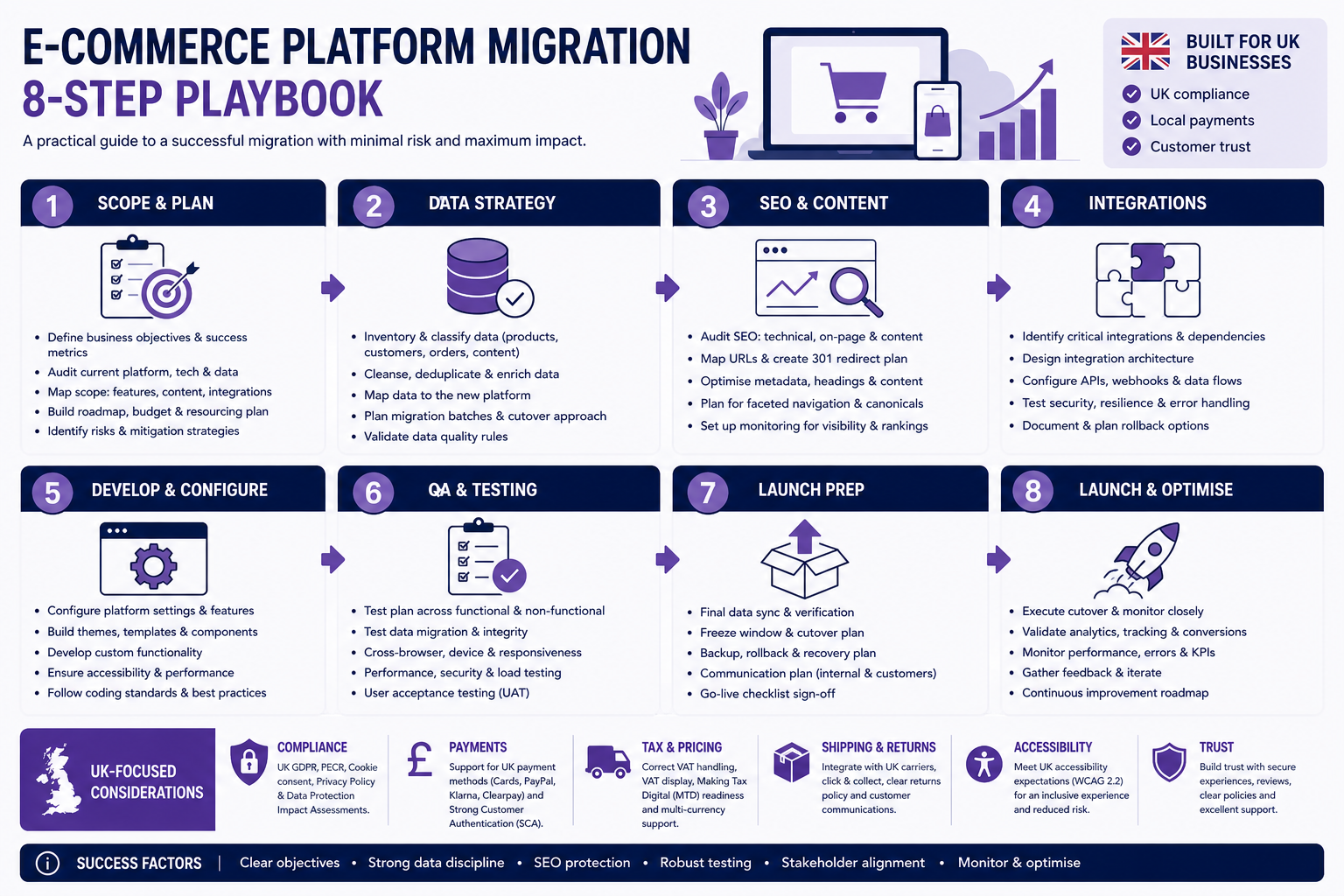
StoreBuilt ecommerce platform migration guide UK: eight-step replatforming playbook from scope to post-launch measurement.

Keyword decision and research inputs

Primary keyword: ecommerce platform migration guide UK

Secondary keywords: replatforming guide UK ecommerce, Shopify migration guide UK, ecommerce migration checklist UK.

Search intent: problem-solving and implementation. Funnel: middle. Page type: playbook.

Step 1: Business case and scope

Document why you are migrating, what success means (revenue, margin, speed, international), and what is explicitly out of scope. Tie scope to a realistic migration timeline.

Step 2: Data and catalogue mapping

WorkstreamDeliverable
Products & variantsField mapping, cleanup rules, media
Collections & navigationNew taxonomy vs legacy URLs
Customers & ordersHistorical data policy (GDPR-aware)
ContentBlogs, policies, landing pages

Step 3: Integration architecture

Inventory ERP, WMS, POS, reviews, loyalty, subscriptions, tax, and analytics before theme polish. Integration failures cause more launch delays than design debates.

Step 4: Storefront and checkout build

Theme or headless build aligned to merchandising, markets, shipping zones, and payment methods. Configure B2B or wholesale if in scope.

Step 5: SEO and redirect governance

  • Export all indexed URLs from Search Console and Bing Webmaster Tools
  • Build redirect tiers: revenue URLs first, long-tail second
  • Plan canonical and hreflang for international stores
  • Prepare sitemap and IndexNow submission list

Deep dive: SEO impact migrating to Shopify.

Step 6: QA and UAT

Test checkout, tax, shipping, refunds, gift cards, subscription flows, and admin workflows. Crawl staging for broken links and orphan PDPs.

Step 7: Launch runbook

Named roles for DNS, redirects, monitoring, customer comms, and rollback. Avoid Friday cutovers and unstaffed weekends.

Step 8: Post-launch measurement

Track organic landing pages, conversion rate, integration error logs, and CS ticket themes for 30 days. Submit updated sitemap to Google and Bing.

Migration guide checklist

  • Scope signed with exit criteria per phase
  • Data mapping reviewed by merchandising and finance
  • Redirect sheet tested on top 500 URLs
  • Integrations load-tested at peak order volume
  • Launch runbook with rollback window
  • Bing and Google sitemaps resubmitted post-launch

StoreBuilt example

A UK food subscription brand migrating from a custom stack used this guide structure to split work across ops, marketing, and finance. Redirect governance alone surfaced 220 legacy campaign URLs that would have 404’d on launch day. Go-live held subscription renewals and organic traffic within tolerance.

Final StoreBuilt point of view

A platform migration guide UK teams ignore is just documentation theatre. The playbook only works when every step has an owner, a gate, and a measurable pass/fail — especially SEO and data.

Migration risk checklist · Contact StoreBuilt

FAQ

Useful questions about this guide.

What should an ecommerce platform migration guide cover?

Discovery, data mapping, integrations, SEO redirects, QA, launch runbook, and 30-day stabilisation — with named owners for each workstream.

How do UK brands protect SEO during platform migration?

Redirect mapping, canonical discipline, sitemap resubmission, and crawl QA on top URLs before and after cutover.

Does StoreBuilt publish migration guides for UK Shopify projects?

Yes. StoreBuilt uses this playbook structure on client migrations and extends it in bespoke delivery runbooks.

How long does a ecommerce SEO migration project usually take?

A simple migration can be planned in weeks, but a serious ecommerce replatform usually depends on catalogue size, integrations, theme rebuild scope, content migration, redirects, analytics QA and launch timing. The safer answer is to plan the work around a readiness checklist, not a fixed calendar guess.

How much should a UK brand budget for ecommerce SEO migration?

Budget depends on data complexity, design scope, app replacement, redirects, ERP or fulfilment integrations and post-launch support. The quote should separate discovery, build, migration QA and support so the team can see where risk and cost really sit.

Will SEO rankings drop during ecommerce SEO migration?

Rankings can drop if URLs, canonicals, metadata, internal links, structured data, page speed or indexation controls change without a migration plan. A strong redirect map, pre-launch crawl, Search Console monitoring and post-launch fixes reduce that risk.

Can order history, customer accounts and saved payment details be migrated?

Order and customer records can usually be migrated, but passwords and saved payment details are controlled by platform security rules. The practical plan should define what moves, what is re-invited, what remains in the old platform for reference and what support messaging customers need.

Is it cheaper to optimise the current platform than to migrate?

Sometimes, yes. If the main issues are merchandising, tracking, page speed, content, theme debt or app governance, focused optimisation may be cheaper than a platform move. Migration makes sense when the current platform blocks growth, integrations, team workflow or maintainability.

What should be tested before a migration goes live?

Test redirects, collections, product variants, checkout, payments, tax, shipping, email flows, analytics events, consent, feeds, search, account journeys and key revenue pages. The launch is not ready until the team can compare the new store against the old store with evidence.

StoreBuilt perspective

This article is part of a wider Shopify agency content system built around commercial next steps.
LondonShopify agency
11service areas
150+ecommerce projects
5.0client feedback

Commercial next steps

Connect this Shopify guide to a StoreBuilt service route.

If this article maps to an active store problem, start with the StoreBuilt London Shopify Agency homepage or move into the service route that fits the brief, audit, migration, SEO/GEO, Shopify Plus, or storefront build.

Keep exploring

Follow the next route that fits this topic.

Continue into a closely related Shopify guide or move straight to the service page that matches the problem this article is addressing.

Ready to build your next Shopify success?

Want StoreBuilt to review this problem against your live store?

Share the store URL and the issue you are trying to solve. We will recommend the right Shopify service path.

Contact StoreBuilt
  • Free discovery call
  • Tailored to your store goals
  • No obligation

Talk to a Shopify specialist

Tell us what your Shopify store needs to achieve next.

Share the store, commercial goal, and current blockers. StoreBuilt will review the brief and reply with the most sensible build, migration, CRO, or support route.

Senior response

A practical view of scope, priorities, and the right first engagement.

Best for

Brands planning a build, migration, CRO sprint, custom development, or ongoing support.

Reply route

Every request is routed to info@storebuilt.co.uk.

We use these details only to review the enquiry and reply with relevant next steps.