
For fashion brands, images do more than decorate the page.
They do product discovery work.
They do trust work.
And when they are handled properly, they also do SEO work.
That is why Shopify image SEO matters so much for apparel stores.
Fashion customers often make their first judgment visually, then use text to validate it. Baymard’s product-page research shows that 56% of users’ first actions on a PDP were to explore the images, and that 52% of sites still do not use descriptive text or graphics for top-selling products, leaving product understanding weaker than it should be.
This guide targets the primary keyword Shopify image SEO, with a specific focus on fashion and apparel brands using Shopify.
If your photography is strong but the organic visibility around product imagery still feels underused, Contact StoreBuilt.
What we have seen in StoreBuilt image audits is this: strong photography alone does not create organic visibility. The stores that get more value from their image layer pair good creative with clearer page context, better filenames, faster delivery, and cleaner variant handling.
Why image SEO matters more for fashion brands
Google’s image guidance is still clear: it uses the page context, standard HTML image elements, filenames, and alt text to better understand the subject matter of images.
For fashion brands, that matters because:
- the image is often the first proof of fit and finish
- product discovery is frequently colour-led
- shoppers compare visual details before reading long copy
- many high-intent landing pages are collection or PDP templates full of imagery
If the store handles its image layer poorly, it makes both SEO and conversion weaker.
1. Use image context to reinforce the exact product intent
Google does not look at the image file in isolation.
It also looks at the surrounding page content.
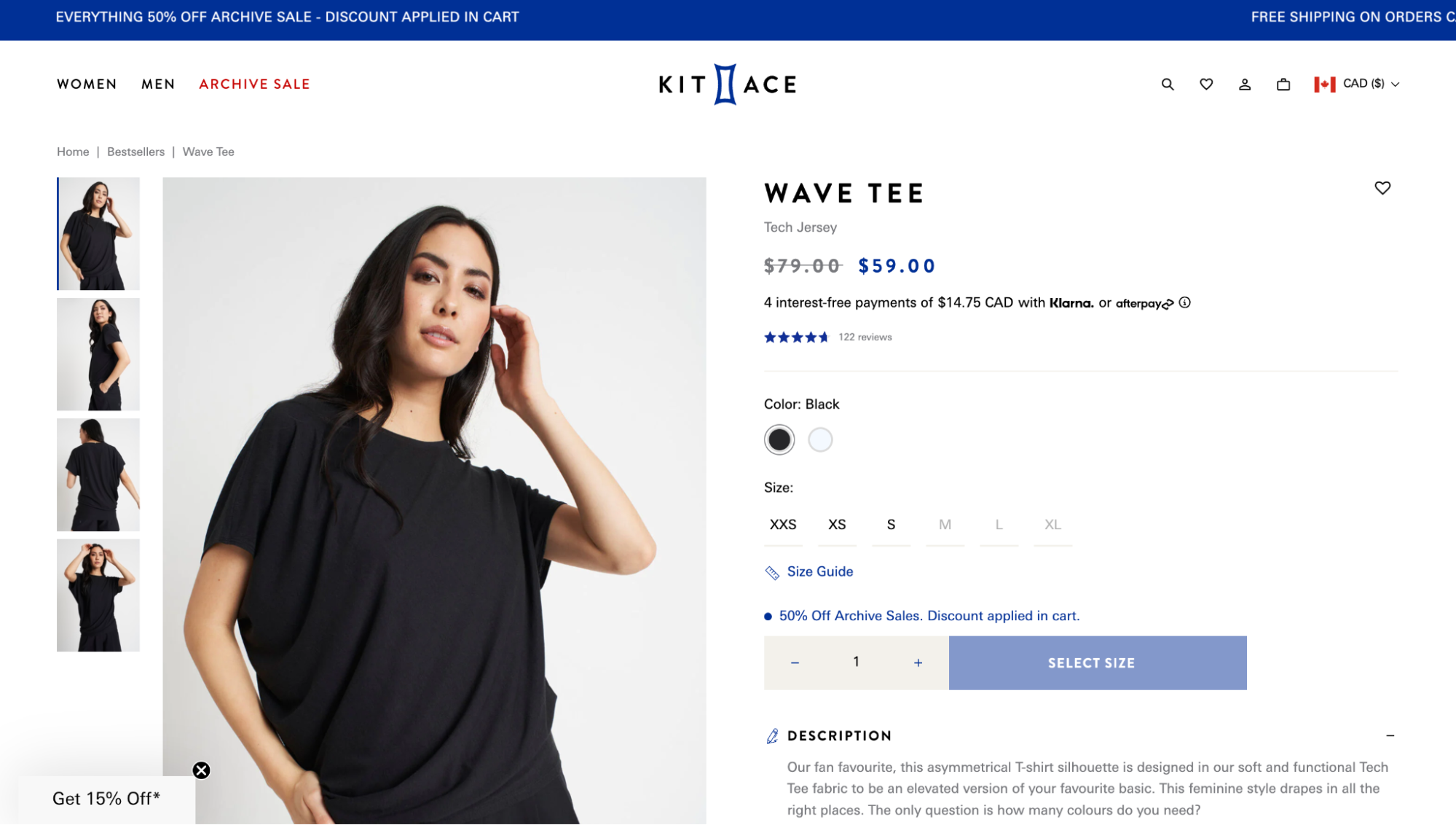
That means a fashion image is strongest when it sits on a page that clearly explains:
- what the product is
- which colour or fit is shown
- what collection it belongs to
- who it is for
This is one reason image SEO should not be treated as a media-library exercise. It works best when PDPs and collections already have stronger structure.
If you need the wider roadmap first, start with Shopify SEO for Fashion Brands in the UK.
2. Write alt text that describes the image, not your keyword ambitions
Google’s image documentation explicitly warns against keyword stuffing in alt text.
The better pattern is:
- describe what the image actually shows
- keep it useful and specific
- make sure it matches the page context
For fashion, that usually means including details such as:
- garment type
- colour
- visible angle or styling context
- material or fit where it is visually clear
Examples:
Women's black linen midi dress front viewBeige oversized blazer worn with matching tailored trousersNavy merino wool jumper close-up knit texture
Weak examples:
dressblack dress black dress womens dress uk fashion dress
Google also notes that alt text can act like anchor text when images are links, which matters on collection cards, editorial tiles, and style-edit modules.
3. Clean up filenames before the image hits the page
Google says filenames provide light clues about the image subject.
That means a fashion store should avoid obviously generic file names where possible.
Better:
womens-black-midi-dress-front.jpglinen-wide-leg-trousers-stone-side-view.jpg
Worse:
IMG_48392.jpglookbook-final-v2.jpg
On large Shopify catalogues, this often needs an upload workflow or content rule rather than relying on manual discipline.
4. Make sure Google can actually find your images
Google’s image documentation still recommends standard HTML image elements and image sitemaps.
That matters on Shopify because brands often rely on:
- CDNs
- lazy loading
- responsive image patterns
- theme logic that can obscure what is loading where
The practical checks are:
- use actual
<img>tags, not CSS background images for important product visuals - make sure image URLs are crawlable
- keep important fashion imagery tied to indexable landing pages
- confirm image sitemap coverage where needed
- verify CDN ownership in Search Console if relevant
This is especially important for campaign-heavy fashion sites where much of the strongest creative lives outside standard product media blocks.
5. Use product images to answer fit and fabric questions faster
Baymard’s apparel research repeatedly points to the same problem: fashion customers need more confidence around fit, feel, and scale.
That means images should help answer:
- how the garment sits on the body
- how the material drapes
- what the texture looks like
- how the colour behaves in context
- what details matter up close
This is one reason StoreBuilt often treats imagery as part of CRO & UX Optimisation, not just SEO. Better image structure improves organic landing quality and decision-making at the same time.
StoreBuilt client example
In one StoreBuilt image audit for an apparel brand, the photography itself was strong, but filenames were generic, alt text was inconsistent, and the selected variant image was not always the one carrying the right context on the page. Search visibility was being limited by implementation, not by creative quality. Once the page context and image logic were treated as one system, the image layer became much more useful commercially.
6. Add human-model imagery where the category needs fit confidence
Baymard’s apparel-focused research highlights how important worn imagery is in visually driven categories.
That is especially true for:
- dresses
- tailoring
- outerwear
- trousers
- knitwear
Cut-out packshots still matter.
But for fashion SEO, they are rarely enough on their own because the customer often needs to understand proportion and fit before clicking deeper into the buying journey.
7. Support collection pages with better image cues
Image SEO is not only a PDP task.
Collection pages also benefit from:
- accurate product thumbnails
- visible colour variation cues
- consistent imagery by category
- editorial imagery that leads to the right products
When collection visuals are vague or repetitive, both click quality and internal discovery weaken.
For fashion brands, Shopify Collection SEO for Fashion Brands and image SEO are closely connected.
8. Use descriptive overlays and supporting graphics when they clarify the product faster
Baymard’s testing shows that 52% of sites miss the opportunity to add descriptive text or graphics to product images, even though doing so can communicate important product details faster.
For fashion, that can help with:
- fabric callouts
- fit notes
- weather suitability
- care or finish details
- product set or outfit composition
The important part is restraint.
The overlay should clarify the product, not turn the image into an ad banner.
9. Keep image performance under control
Strong product photography is not a licence to overload the page.
Fashion brands often slow their stores through:
- oversized hero photography
- too many first-screen images
- uncompressed campaign assets
- duplicated media across modules
This is where Shopify Speed Optimisation becomes part of image SEO. If the image experience drags page usability down, the organic opportunity weakens too.
10. Track image-led pages in Search Console, not just sitewide performance
For fashion brands, image SEO performance often shows up first in category and PDP templates.
Review:
- which product families gain image-led impressions
- which collection pages drive image visibility
- whether colour or fit-specific pages are being surfaced
- whether heavily photographed categories outperform less-supported ones
If you want a more specific audit of your current product imagery, PDP structure, and search visibility for fashion collections, Contact StoreBuilt.
High-intent AI search implementation layer
The AI-search version of this topic is not just “write more content”. A useful answer engine result needs a page that gives a direct answer, proves the claim, and shows the next operational step inside Shopify.
| Area | StoreBuilt implementation check |
|---|---|
| Primary intent | The page should map to Shopify image SEO and one clear buyer or operator problem, not a vague traffic topic. |
| Shopify surface | Identify whether the work belongs on a collection, product page, theme section, checkout step, app workflow, email flow, or support process. |
| Proof | Add first-hand observations, product/category examples, screenshots, policy notes, review signals, or trustworthy external sources where they make the advice safer. |
| Internal route | Link the reader to the service most likely to solve the issue: Shopify SEO and AI search readiness. |
| Measurement | Check Search Console, analytics, assisted conversions, enquiry quality, and AI-response mentions after the update rather than judging success by pageviews alone. |
For this article, the useful research inputs are: StoreBuilt Shopify audits, UK ecommerce SERP intent, Shopify platform documentation, and AI-search measurement patterns. StoreBuilt would prioritise technical SEO, collection architecture, Product schema, answer-first content, GEO, and Search Console monitoring before expanding into broader supporting content.
If this topic maps to a live store problem, review the related StoreBuilt service or Contact StoreBuilt with the store URL and the issue you want fixed.
Final thought
Our view at StoreBuilt is that image SEO is not a media-library task.
For fashion brands, it sits at the intersection of photography, merchandising, template logic, and site speed. Google should be able to understand the image, the customer should be able to trust the product, and the page should load well enough that neither of those wins gets lost.
If you want StoreBuilt to review your fashion image stack across PDPs, collections, and campaign pages, Contact StoreBuilt.