

Fashion product pages are rarely single-product pages in the way Google sees them.
They are usually variant systems.
One dress can exist across:
- multiple colours
- multiple sizes
- multiple lengths
- multiple fabric treatments
If that structure is unclear to search engines or confusing to users, the page loses visibility and conversion strength at the same time.
This guide targets the primary keyword Shopify product variant SEO and focuses on how fashion brands can handle size, colour, and PDP detail more cleanly on Shopify.
If your fashion PDPs feel hard to scale and hard to optimise, Contact StoreBuilt.
What we have seen in StoreBuilt PDP reviews is this: variant-heavy catalogues rarely lose traffic because Google cannot crawl them at all. They lose it because the parent product, selected variation, and supporting content never become clear together for either the crawler or the shopper.
Why variant SEO matters more in fashion than in many other sectors
For fashion brands, the variant is often the buying decision.
Customers are not just choosing the product.
They are choosing:
- the colour
- the size
- the fit
- the material feel
- the exact version they can imagine wearing
Google’s current product variant guidance reflects this reality. Product variants in categories like apparel should be grouped clearly so Google can understand which items belong to the same parent product and which details differ by variant.
That makes variant structure a real SEO issue, not just a merchandising detail.
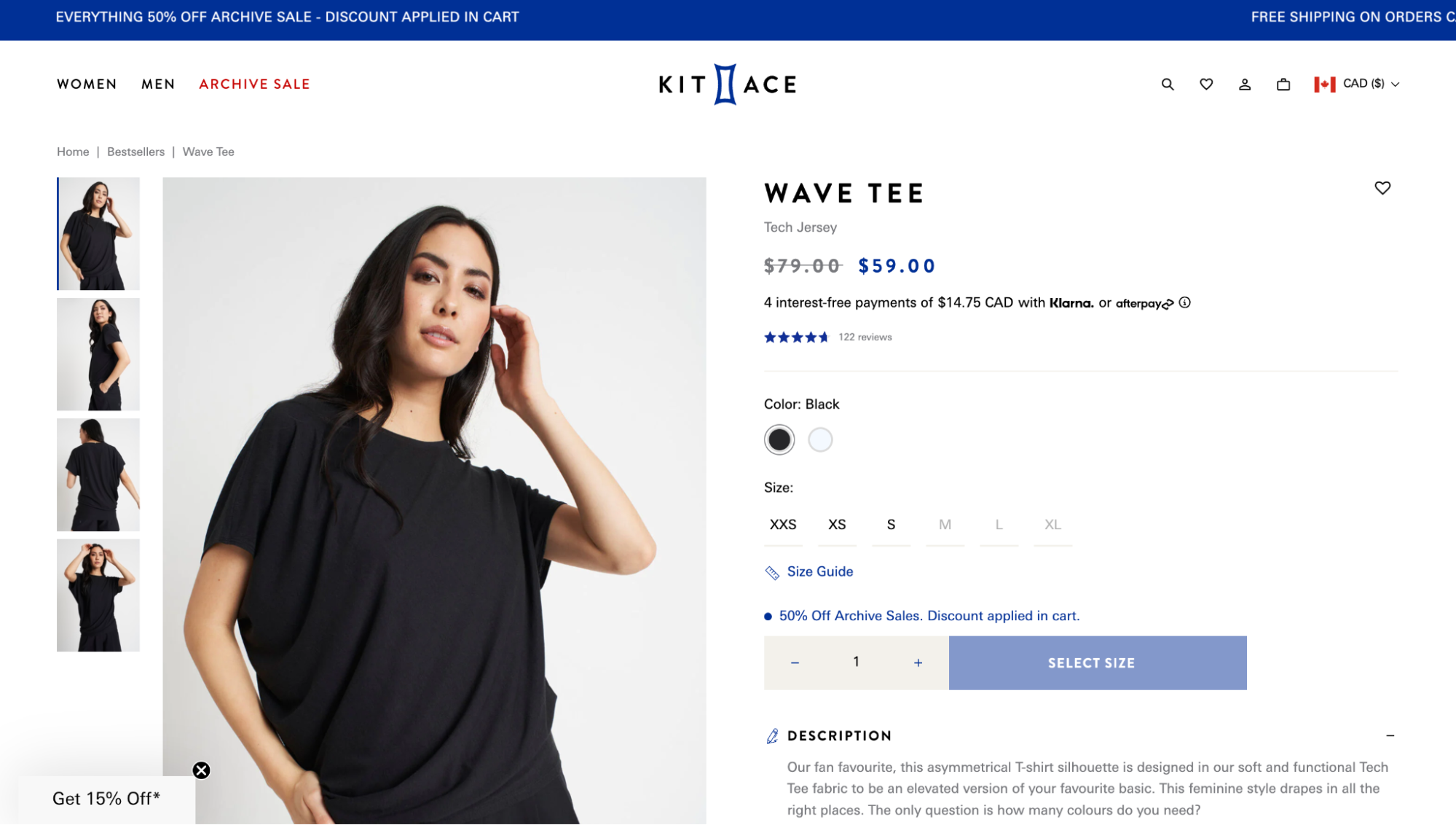
1. Decide whether variants belong on one PDP or across multiple URLs
Fashion brands usually end up in one of two patterns:
- one PDP with selectable variants
- multiple PDPs for distinct style versions
Neither is automatically right.
The important part is consistency.
If multiple URLs represent what is effectively the same parent product, the store needs a clear plan for:
- canonical logic
- internal linking
- image selection
- structured data
- search-result presentation
Google’s variant documentation is especially relevant here because it expects the site to represent product groups and their variants clearly.
2. Give each selectable variant a proper state the user can land on
For fashion, variant landing matters because the visual difference often drives the click.
That means a user who lands on a preselected colour or style should see:
- the correct image
- the correct availability
- the correct price where relevant
- the correct size options
This is not just a UX issue.
Google’s variant guidance explicitly points out that variants should be directly preselectable with distinct URLs so search systems can understand and crawl them properly.
3. Use product titles and supporting copy that clarify the parent product and the variant context
A fashion PDP title should usually define the core product cleanly.
Then the surrounding content should clarify what changes at variant level.
For example:
- core product name
- colour name
- fit summary
- fabric detail
- care or wear context
The goal is not to create a near-duplicate paragraph for every size.
The goal is to make the page clear enough that both users and search engines understand what the product is and what specifically changes as variants are selected.
4. Add ProductGroup and Product structured data where the setup supports it
Google now supports clearer variant markup through ProductGroup and nested variant Product data.
That matters especially for apparel, where the same item commonly varies by:
- colour
- size
- material
- pattern
For fashion brands on Shopify, that creates a real opportunity to improve how product families are understood in search.
If your current theme or app setup makes structured data brittle or incomplete, Shopify Store Design & Development and Shopify SEO & AI Search Readiness usually need to work together rather than leaving schema as an afterthought.
5. Treat colour imagery as a search and conversion asset
Fashion customers often decide through visuals first.
That makes colour-state imagery critical.
For variant-heavy fashion PDPs, review whether:
- each colour state shows the right hero image
- thumbnails match the actual selected option
- image order supports decision-making
- alt text reflects what the user is seeing
- images load clearly without overloading the page
This is one of the biggest lost opportunities in fashion Shopify stores. The variant exists, but the media handling is too weak to support it properly.
Anonymous client example
In one anonymised PDP review, a fashion brand had colour variants split across inconsistent page states and some sizes behaving like dead ends when stock got tight. The product itself was strong, but the page made users work too hard to confirm what changed between variants. The fix was to make the parent product clearer, keep imagery and swatches aligned, and stop thin variant states from looking like separate SEO opportunities.
6. Resolve fit, sizing, and fabric questions before they create bounce
Fashion PDP SEO improves when the page answers the real buying questions.
That often means adding clearer information around:
- model size and fit notes
- garment cut
- fabric composition
- lining or stretch detail
- care instructions
- length or silhouette guidance
These details help the user stay on the page longer and give the PDP more useful, product-specific language.
That is one reason fashion SEO and CRO overlap so strongly on Shopify.
If the PDP still feels thin or generic, Contact StoreBuilt.
7. Avoid near-duplicate product families where one parent product would be cleaner
Some fashion brands accidentally create multiple products where one grouped product would be more coherent.
That often happens when:
- colours are split into separate PDPs without a clear reason
- similar cuts are duplicated with shallow naming changes
- sale versions of the same item create separate pages
This can weaken:
- internal linking
- structured data consistency
- review aggregation
- image signals
- search clarity
Sometimes the better solution is not more pages. It is a cleaner product-group structure.
8. Make out-of-stock and low-stock handling work with long-term visibility
Fashion stock changes quickly.
That creates SEO decisions around:
- temporarily unavailable sizes
- discontinued colours
- fully sold-out PDPs
- seasonal returns of the same item
The right answer depends on whether the product or variant is likely to come back.
But the wrong answer is often the same: removing useful pages too aggressively or leaving dead-end experiences live too long.
This is where Support, Maintenance & Technical Audits becomes part of SEO hygiene. Fashion inventory changes can quietly create crawl and UX problems over time.
9. Use internal links to connect PDPs with the right discovery routes
A fashion product page should not feel isolated.
It should connect back into:
- the right collection
- complementary categories
- edit pages
- related fits or fabrics
- styling content where relevant
This matters because fashion discovery is often iterative. Customers compare across adjacent items before buying.
That is also why Shopify Collection SEO for Fashion Brands is part of the same cluster. PDP SEO is stronger when the category layer is doing its job.
10. Review PDP performance by variant-rich product families
For fashion brands, PDP analysis is often more useful by family than by isolated SKU.
Look for patterns across:
- dresses
- tailoring
- knitwear
- footwear
- outerwear
That often reveals:
- weak fit content
- under-specified fabric copy
- variant URLs that are hard to crawl
- image handling problems
- colour naming that is too vague
If you want a more strategic review of those product families, Contact StoreBuilt.
Final thought
Our view at StoreBuilt is that variant complexity is not an excuse for a thin PDP.
Fashion stores usually perform better when one parent product, one clear selection state, and one trustworthy content model work together. If either the crawler or the customer is left guessing, the page underperforms.
If you want StoreBuilt to review your variant structure, product-page content, and fashion PDP setup on Shopify, Contact StoreBuilt.