

If you want more organic traffic from Shopify, you do not need a random pile of SEO tasks. You need a checklist that matches how Shopify stores are actually structured, how customers actually search, and how commercial pages actually make money.
That distinction matters.
Many Shopify SEO articles stay too generic. They tell you to “add keywords,” “write content,” and “improve speed” without explaining which page type should target which intent, how collections should be structured, or what usually breaks during real storefront changes.
This guide is built for ecommerce teams that want a practical Shopify SEO checklist they can actually use.
It is also written from a StoreBuilt perspective. We work on live Shopify storefronts where SEO does not sit on its own. It overlaps with migrations, collection structure, product page UX, internal linking, merchandising, and what happens after launch when the store keeps changing.
If you want a senior review of your current Shopify SEO setup, Contact StoreBuilt.
A StoreBuilt review lens from live Shopify stores
The fastest way to make Shopify SEO advice useful is to test it against real stores, not abstract examples.
Across StoreBuilt storefront work, a few patterns show up repeatedly:
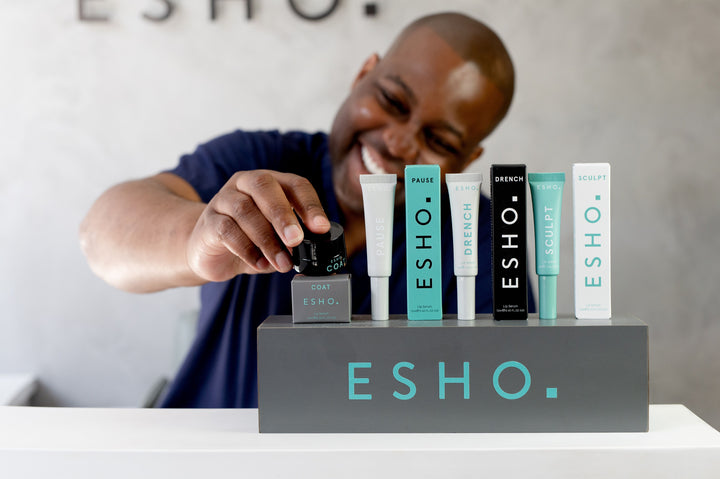
- ESHO uses clear product families, bundle routes, awards, and press paths that help both discovery and trust.
- Rejuvia puts reviews, ingredients, FAQs, and comparison content close to the buying journey instead of hiding it.
- The Nude Wine Co. leans on strong taxonomy with routes by grape, region, pairings, boxes, and educational content.
Those are not just design choices. They affect how search intent maps to templates, how internal links flow through the site, and how much useful context search engines can actually understand.
1. Start with keyword mapping, not blog writing
The best Shopify SEO work usually starts before the content is written.
For this topic, the primary keyword target is “Shopify SEO checklist” and the secondary cluster sits around:
- Shopify SEO
- Shopify product page SEO
- Shopify collection page SEO
- Shopify technical SEO
- Shopify organic traffic
That matters because each keyword tends to map to a different kind of page.
In practice, the structure usually looks like this:
- collection pages target broad commercial intent
- product pages target specific buying intent
- service pages target high-intent lead generation
- blog posts target informational and comparison intent
One of the biggest SEO mistakes on Shopify is trying to make one page rank for every variation of intent. A collection page should not try to act like a long-form guide, and a blog post should not replace a strong commercial collection or service landing page.
Before writing or rewriting anything, build a simple sheet with:
- the keyword
- the search intent
- the correct page type
- the current URL
- the target title and H1
That one exercise usually exposes cannibalisation, thin pages, and missed collection opportunities very quickly.
2. Know what Shopify handles automatically and what it does not
Shopify does help with some SEO fundamentals out of the box.
According to Shopify Help, Shopify automatically generates canonical tags, sitemap.xml, robots.txt, theme title tags, and SSL support. It also lets you manually edit titles, meta descriptions, URLs, and image alt text.
That is useful, but it does not mean Shopify SEO is “done by default.”
You still need to review:
- keyword-to-page mapping
- collection structure
- product page copy depth
- internal linking
- redirect handling
- duplicate or weak content
- Search Console coverage and performance
The platform gives you a base. It does not give you a strategy.
3. Build collection pages for commercial intent
For many Shopify stores, collection pages are some of the most valuable SEO pages on the entire site.
That is especially true when customers search by:
- product type
- use case
- ingredient
- category
- concern
- material
- region
- flavour
- size
- audience
A strong collection page should not just list products. It should make the intent clear.
That usually means:
- a precise title
- a useful H1
- a short introduction that actually helps the user
- product ordering that matches buying logic
- filters that support decisions
- enough internal links to adjacent categories and buying paths
The Nude Wine Co. is a useful example here. Its structure gives people routes by region, red and white grapes, food pairings, oak level, acidity, boxes, and Wine Club entry points. That is the kind of taxonomy that opens up long-tail SEO opportunities because it matches how real people browse and compare.

If your collection structure is weak, generic, or driven only by internal catalogue logic, both SEO and conversion usually suffer.
4. Improve product page SEO with real product information
Product page SEO is where many Shopify stores lose easy wins.
Search engines and AI shopping surfaces need specific, descriptive product information. Shopify’s current guidance for AI platform optimisation highlights the importance of accurate titles, descriptions, images, product organisation fields, variants, barcodes, policies, and FAQs.
That overlaps heavily with conversion anyway.
A stronger Shopify product page usually includes:
- a descriptive title
- category-relevant product summary
- useful image hierarchy
- visible delivery or returns context
- ingredient, material, or specification detail
- FAQs that answer real hesitation
- review or proof content where relevant
Rejuvia is a good example of a store that keeps buyer information close to the journey. The storefront visibly routes users into reviews, ingredients, FAQs, and comparative product education instead of leaving those questions buried or missing.

When product pages are thin, generic, or copied from manufacturer text, rankings usually become less stable and the conversion rate often suffers as well.
If you want a second opinion on your collections, PDPs, or internal structure, Contact StoreBuilt.
5. Fix titles, H1s, and meta descriptions on money pages first
One of the quickest improvements on Shopify is reviewing the pages that already matter most and tightening the way they are presented in search.
Shopify recommends putting relevant keywords into titles, descriptions, image alt text, and page content. Shopify’s own SEO guidance also calls out short, descriptive titles and concise meta descriptions that are written for clicks as well as indexing.
The rule is simple:
- use the main keyword naturally
- make the title specific
- write for the actual click
- avoid bloated or repeated templates
For collection pages, this often means shifting away from vague labels toward clearer commercial phrasing.
For product pages, it often means making the product type, core attribute, or use case more visible.
For blog posts, it means aligning the title with the exact question or checklist the reader is searching for.
Also make sure the visible H1 still matches the intent of the page. A mismatch between title tag, H1, and body content usually weakens clarity rather than helping it.
6. Strengthen internal linking through navigation, bundles, and content
Internal links are one of the most overlooked growth levers on Shopify.
Good internal linking does three things at once:
- helps search engines understand page relationships
- helps users move into the next relevant page faster
- helps priority pages receive more internal authority
This should go beyond a footer menu.
Useful internal linking opportunities include:
- navigation and mega menus
- related collections
- related product blocks
- bundles and kits
- FAQs
- journal or blog articles
- buying guides
- collection intros
ESHO is a good reminder here. Product families, kits, bundle routes, awards, and press sections create more pathways than a flat catalogue would. The Nude Wine Co. does the same from its journal and pairing content back into product discovery routes.
If your blog content is isolated from collections and service pages, the SEO value is weaker than it should be.
That is also why StoreBuilt usually treats Shopify SEO & AI Search Readiness and CRO & UX Optimisation as connected workstreams, not separate silos.
7. Use image alt text to describe the page honestly
Image SEO on Shopify is usually handled badly in one of two ways:
- no alt text at all
- keyword-stuffed alt text that reads unnaturally
Alt text should describe the image in a way that is useful and relevant to the page.
For product photography, that often means naming:
- the product
- the variant
- the material or finish
- the context if it matters
For editorial or supporting imagery, it should explain what is visibly there and why it belongs on the page.
If the image is decorative and adds no useful context, there is no SEO gain in forcing a clumsy keyword string into the alt field.
8. Submit your sitemap and use Search Console after important changes
Shopify automatically generates sitemap files and updates them when you add or change products, collections, pages, images, or blog posts.
That does not remove the need for Search Console.
After launching a new store, restructuring collections, publishing new landing pages, or shipping a migration, you should still:
- verify the domain in Google Search Console
- submit the sitemap
- inspect the key URLs
- monitor indexing and coverage
- review clicks, impressions, and CTR at page level
This is where many teams lose momentum. They publish content and then never check how Google is actually treating the page.
9. Handle redirects carefully during migrations and restructures
Redirect mistakes can erase a lot of otherwise good SEO work.
Shopify’s current redirect guidance is worth reading closely because there are platform-specific limitations. Redirects only work from broken URLs, certain URL prefixes are reserved, fixed Shopify paths cannot be redirected, and redirects start working immediately once created. Shopify also notes that one redirect can apply across market subfolders unless you intentionally need a different destination for a given locale.
That means migration or restructure work should include:
- redirect mapping before launch
- old-to-new URL validation
- checks for reserved path conflicts
- product and collection visibility review
- Search Console checks after go-live
This is exactly why SEO should be part of Shopify Migrations & Replatforming, not an afterthought added at the end.
If a migration, taxonomy change, or collection rebuild is already on your roadmap, Contact StoreBuilt before the redirect work gets rushed.
10. Build supporting content around real buying questions
Blog content should support the store, not drift away from it.
The most useful Shopify SEO content usually sits close to real customer questions:
- comparisons
- buying guides
- ingredient explainers
- care and maintenance content
- use-case content
- gifting content
- pairing content
- size or fit guidance
The Nude Wine Co. is a strong example of this because the journal and pairing content are naturally close to product discovery. That creates a healthier relationship between informational pages and commercial pages.
The right content cluster depends on the category, but the principle stays the same: build content that helps the customer make a better decision and then link it back into the right collections or products.
11. Add AI search readiness to the checklist
This is the part many Shopify stores still ignore.
Shopify now explicitly recommends improving product detail quality for AI platforms by tightening product titles, descriptions, images, organisation fields, variants, policy accuracy, and FAQs. That is not separate from SEO. It is becoming part of the same visibility layer.
For StoreBuilt, the practical implication is straightforward:
- richer product data helps search matching
- stronger FAQs help answer product questions faster
- clearer policies reduce ambiguity
- better taxonomy improves both navigation and discoverability
If your product data is shallow, AI visibility usually becomes shallow too.
12. Run a monthly Shopify SEO review, not a one-off audit
SEO work on Shopify tends to decay when the store is active.
Why? Because teams keep changing products, menus, collections, merchandising blocks, apps, landing pages, and campaign structure.
A simple monthly review should cover:
- top collection pages
- top product pages
- key blog and landing pages
- broken links and 404s
- recent redirect additions
- Search Console click and CTR changes
- internal links to priority pages
- newly published or thin pages
This is usually more valuable than waiting six months and running a giant audit after problems have accumulated.
When to bring in a Shopify SEO agency
Some stores can handle the basics internally. Others hit a point where the SEO work is no longer just metadata and blog writing.
That usually happens when:
- the store is migrating platforms
- collection structure needs rethinking
- rankings are split across the wrong page types
- internal linking is weak
- product pages need better content architecture
- Search Console issues keep recurring
- the store also needs CRO and UX work at the same time
At that stage, the right answer is usually not a bigger checklist. It is better execution.
If you want StoreBuilt to review the current store, prioritise the highest-impact Shopify SEO fixes, and connect them to real development scope, Contact StoreBuilt.